本文最后更新于42 天前,其中的信息可能已经过时,如有错误请发送邮件到1077511618@qq.com

在 Unity 中简单地应用 XML 实现数据持久化
通过鄙人先前发布的XML入门笔记,现在已经对XML的语法规则、注意事项等有了初步了解,是时候尝试将其应用于我们Unity的实际开发中了
示例项目目标
- 能进行对用户账户信息的读取以及打印输出;
- 能进行新用户的注册;
- 能进行对用户的注销;
- 实现数据更新及持久化。
开始
准备好存储用户账户信息的XML文件
示例:
<!-- Unity XML测试 (test.xml) -->
<users>
<user account="TokaiTeio" password="1993"></user>
<user account="MejiroMcQueen" password="1992"></user>
<user account="SpecialWeek" password="1998"></user>
<user account="ScilenceSuzuka" password="1991"></user>
</users>
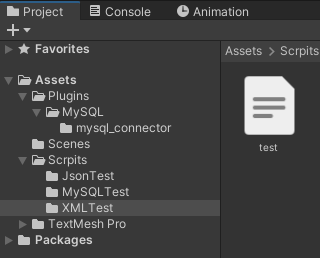
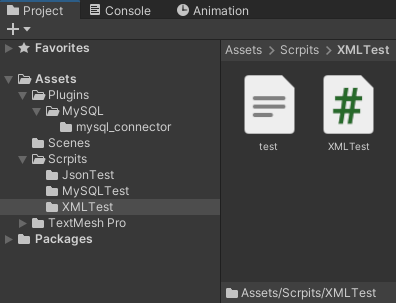
有了XML文件后,我们可以将其拖入Unity编辑器中的内容区,这样我们的XML文件就成为了一个 TextAsset:

准备测试代码编写
新创建一个C#脚本,将其命名为 XMLTest:
为了实现对XML文件的各种操作,我们需要引入以下两个命名空间:using System.Xml; using System.IO;C#中XML节点相关的类
XML 文档本质上是一棵树,树上的每一个”点”都叫节点(Node),有关于XML的节点有以下几种常见类型:
- XmlNode:所有节点的基类,代表 XML 树里任意一个节点;
- XmlElement:XmlNode的子类,专门代表元素节点(例如、这种标签);
- XmlText:文本节点,代表元素里的纯文本内容;
- XmlComment:注释节点,代表XML里面的注释;
- XmlAttribute:属性节点,代表元素的属性;
- XmlDocument:文档节点,代表整个XML文档,是整棵树的根,也是操作入口;
- ……
| XML节点的共有属性/方法: | 成员 | 含义 |
|---|---|---|
Name |
节点名称 | |
Value |
节点值 | |
InnerText |
节点内所有文本 | |
ChildNodes |
子节点列表 | |
ParentNode |
父节点 | |
Attributes |
属性集合(部分节点才有) | |
AppendChild() |
追加子节点 | |
RemoveChild() |
移除子节点 | |
SelectSingleNode() |
XPath 查单个 | |
SelectNodes() |
XPath 查多个 |
编写测试脚本
迈出简单的第一步————读取并打印XML文件中的数据
示例代码:
using UnityEngine;
using System.Xml;
using System.IO;
using System.Text;
public class XMLTest : MonoBehaviour
{
public TextAsset xmlFile;
private XmlDocument xmlDocument;
void Start()
{
if (xmlFile == null) return;
xmlDocument = new XmlDocument();
// 使用 StringReader 读取 TextAsset 的文本
using (StringReader reader = new StringReader(xmlFile.text))
{
xmlDocument.Load(reader);
}
// 获取根节点下的所有子节点
XmlNodeList nodes = xmlDocument.SelectSingleNode("users").ChildNodes;
foreach (XmlElement item in nodes)
{
string account = item.GetAttribute("account");
string password = item.GetAttribute("password");
Debug.Log("Account: " + account + " Password: " + password);
}
}
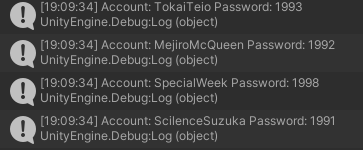
}保存并编译代码后运行项目,可以看到控制台输出了从文件中读取到的账户信息:
实现账户注册功能
更改文件读取方式
在 Unity 中,TextAsset 是只读的,所以这里开始我们需要进行修改,从持久化路径创建并读取文件
将上面的代码进行修改,示例(为了将两种读取文件方式进行一同展示并方便文件创建,我保留了从TextAsset读取的方法并直接将我们刚刚添加TextAsset文件进行复制):
// 修改后的代码:
using System.Collections;
using System.Collections.Generic;
using UnityEngine;
using System.Xml;
using System.IO;
using System.Text;
using Org.BouncyCastle.Asn1.X509;
using System.Threading.Tasks;

public class XMLTest : MonoBehaviour
{
    public TextAsset xmlFile;
    [Header("XML文件读取方式")]
    [Tooltip("勾选使用TextAsset的方式仅可读取文件,无法进行写入操作!")]
    public bool UseTextAsset = true;
    [Header("准备注册的用户信息")]
    public string newAccount;
    public string newPassword;
    [Header("待删除的用户信息")]
    public string userAccount;

    private string savePath;
    private XmlDocument xmlDocument;

    void Start()
    {
        savePath = Path.Combine(Application.persistentDataPath , "users.xml");
        Debug.Log("存档路径:" + savePath);

        CopyTextAssetToPersistent();

        if (UseTextAsset)
        {
            if (xmlFile == null) return;

            xmlDocument = new XmlDocument();
            // 使用 StringReader 读取 TextAsset 的文本
            using (StringReader reader = new StringReader(xmlFile.text))
            {
                xmlDocument.Load(reader);
            }

            // 获取根节点下的所有子节点
            XmlNodeList nodes = xmlDocument.SelectSingleNode("users").ChildNodes;
            foreach (XmlElement item in nodes)
            {
                string account = item.GetAttribute("account");
                string password = item.GetAttribute("password");
                Debug.Log("Account: " + account + " Password: " + password);
            }
        }

        else if (!UseTextAsset)
        {
            // 读取文件(如果无法读取就新建)
            xmlDocument = LoadXmlFile();

            // 打印文件内容
            foreach (XmlElement item in xmlDocument.SelectNodes("users/user"))
            {
                string account = item.GetAttribute("account");
                string password = item.GetAttribute("password");
                Debug.Log("Account: " + account + " Password: " + password);
            }
        }
    }

    // 从保存路径中加载文件,如果文件不存在则进行创建
    XmlDocument LoadXmlFile()
    {
        xmlDocument = new XmlDocument();
        if (File.Exists(savePath))
        {
            xmlDocument.Load(savePath);
        }
        else
        {
            // 创建根节点 <users>
            XmlElement rootNode = xmlDocument.CreateElement("users");
            xmlDocument.AppendChild(rootNode);
        }
        return xmlDocument;
    }

    // 将已有文件进行拷贝
    void CopyTextAssetToPersistent()
    {
        if (File.Exists(savePath))
        {
            Debug.Log("存档已存在,跳过初始化");
            return;
        }

        // 直接写入文本的简单方式
        File.WriteAllText(savePath , xmlFile.text , new UTF8Encoding(false));
        Debug.Log("已经从 TextAsset 初始化存档:" + savePath);
    }
}
添加账户注册功能
在我们的示例项目中,添加账户注册功能本质是将新的账户信息写入XML文件,所以可以将相关方法添加到类中,这里给出代码示例:
// 在程序结束时保存更新 XML 文件
void OnDestroy()
{
    SaveFile();
}

// 将以下两个方法添加到 XMLTest 类下:
// 由于直接给 xmlDocument 添加元素没有涉及到对磁盘中文件的实际操作,所以在添加元素后我们需要在程序结束时进行写入保存
void SaveFile()
{
    var settings = new XmlWriterSettings
    {
        Indent = true,
        IndentChars = "     ",
        Encoding = new UTF8Encoding(false)
    };

    using(XmlWriter writer = XmlWriter.Create(savePath , settings))
    {
        xmlDocument.Save(writer);
    }
    Debug.Log("用户信息文件已保存:" + savePath);
}

// 新增用户
[ContextMenu("注册用户")]
public void RegisterNewUser()
{
    XmlElement newUser = xmlDocument.CreateElement("user");
    newUser.SetAttribute("account" , newAccount);
    newUser.SetAttribute("password" , newPassword);

    xmlDocument.DocumentElement.AppendChild(newUser);

    Debug.Log("已新增用户信息:nAccount: " + newAccount + " Password: " + newPassword);
}
实现账户注销功能
System.Xml 库中提供了删除节点的方法,可以参考以下示例:
// 将以下方法添加到 XMLTest 类中:
// 删除用户
[ContextMenu("注销用户")]
public void DeletUser()
{
    XmlNode targetNode = null;
    // 查询待删除用户是否存在
    bool isUserExit = false;
    XmlNodeList nodes = xmlDocument.SelectSingleNode("users").ChildNodes;
    foreach (XmlElement item in nodes)
    {
        if (item.GetAttribute("account") == userAccount)
        {
            isUserExit = true;
            targetNode = item;
            break;
        }
    }

    // 删除用户操作
    if (!isUserExit)
    {
        Debug.Log("注销用户失败:无法找到用户账号" + userAccount);
    }
    else
    {
        targetNode.ParentNode.RemoveChild(targetNode); // 通过获取到的目标节点,反向找出其父节点并调用父节点的 RemoveChild 方法移除此目标节点
        Debug.Log("成功注销用户:" + userAccount);
    }
}
完成后的项目示例
完整代码示例
using System.Collections;
using System.Collections.Generic;
using UnityEngine;
using System.Xml;
using System.IO;
using System.Text;
using Org.BouncyCastle.Asn1.X509;
using System.Threading.Tasks;

public class XMLTest : MonoBehaviour
{
    public TextAsset xmlFile;
    [Header("XML文件读取方式")]
    [Tooltip("勾选使用TextAsset的方式仅可读取文件,无法进行写入操作!")]
    public bool UseTextAsset = true;
    [Header("准备注册的用户信息")]
    public string newAccount;
    public string newPassword;
    [Header("待删除的用户信息")]
    public string userAccount;

    private string savePath;
    private XmlDocument xmlDocument;

    void Start()
    {
        savePath = Path.Combine(Application.persistentDataPath , "users.xml");
        Debug.Log("存档路径:" + savePath);

        CopyTextAssetToPersistent();

        if (UseTextAsset)
        {
            if (xmlFile == null) return;

            xmlDocument = new XmlDocument();
            // 使用 StringReader 读取 TextAsset 的文本
            using (StringReader reader = new StringReader(xmlFile.text))
            {
                xmlDocument.Load(reader);
            }

            // 获取根节点下的所有子节点
            XmlNodeList nodes = xmlDocument.SelectSingleNode("users").ChildNodes;
            foreach (XmlElement item in nodes)
            {
                string account = item.GetAttribute("account");
                string password = item.GetAttribute("password");
                Debug.Log("Account: " + account + " Password: " + password);
            }
        }

        else if (!UseTextAsset)
        {
            // 读取文件(如果无法读取就新建)
            xmlDocument = LoadXmlFile();

            // 打印文件内容
            foreach (XmlElement item in xmlDocument.SelectNodes("users/user"))
            {
                string account = item.GetAttribute("account");
                string password = item.GetAttribute("password");
                Debug.Log("Account: " + account + " Password: " + password);
            }
        }
    }

    void OnDestroy()
    {
        SaveFile();
    }

    XmlDocument LoadXmlFile()
    {
        xmlDocument = new XmlDocument();
        if (File.Exists(savePath))
        {
            xmlDocument.Load(savePath);
        }
        else
        {
            // 创建根节点 <users>
            XmlElement rootNode = xmlDocument.CreateElement("users");
            xmlDocument.AppendChild(rootNode);
        }
        return xmlDocument;
    }

    void CopyTextAssetToPersistent()
    {
        if (File.Exists(savePath))
        {
            Debug.Log("存档已存在,跳过初始化");
            return;
        }

        // 直接写入文本的简单方式
        File.WriteAllText(savePath , xmlFile.text , new UTF8Encoding(false));
        Debug.Log("已经从 TextAsset 初始化存档:" + savePath);
    }

    void SaveFile()
    {
        var settings = new XmlWriterSettings
        {
            Indent = true,
            IndentChars = "     ",
            Encoding = new UTF8Encoding(false)
        };

        using(XmlWriter writer = XmlWriter.Create(savePath , settings))
        {
            xmlDocument.Save(writer);
        }
        Debug.Log("用户信息文件已保存:" + savePath);
    }

    #region 公共方法(增删改)
    // 新增用户
    [ContextMenu("注册用户")]
    public void RegisterNewUser()
    {
        XmlElement newUser = xmlDocument.CreateElement("user");
        newUser.SetAttribute("account" , newAccount);
        newUser.SetAttribute("password" , newPassword);

        xmlDocument.DocumentElement.AppendChild(newUser);

        Debug.Log("已新增用户信息:nAccount: " + newAccount + " Password: " + newPassword);
    }

    // 删除用户
    [ContextMenu("注销用户")]
    public void DeletUser()
    {
        XmlNode targetNode = null;
        // 查询待删除用户是否存在
        bool isUserExit = false;
        XmlNodeList nodes = xmlDocument.SelectSingleNode("users").ChildNodes;
        foreach (XmlElement item in nodes)
        {
            if (item.GetAttribute("account") == userAccount)
            {
                isUserExit = true;
                targetNode = item;
                break;
            }
        }

        // 删除用户操作
        if (!isUserExit)
        {
            Debug.Log("注销用户失败:无法找到用户账号" + userAccount);
        }
        else
        {
            targetNode.ParentNode.RemoveChild(targetNode);
            Debug.Log("成功注销用户:" + userAccount);
        }
    }
    #endregion
}
项目运行示例
上面忘了说了,编写完脚本后别忘了把脚本挂载到场景中的物体上哦!(我这里是挂载到了一个空物体上)
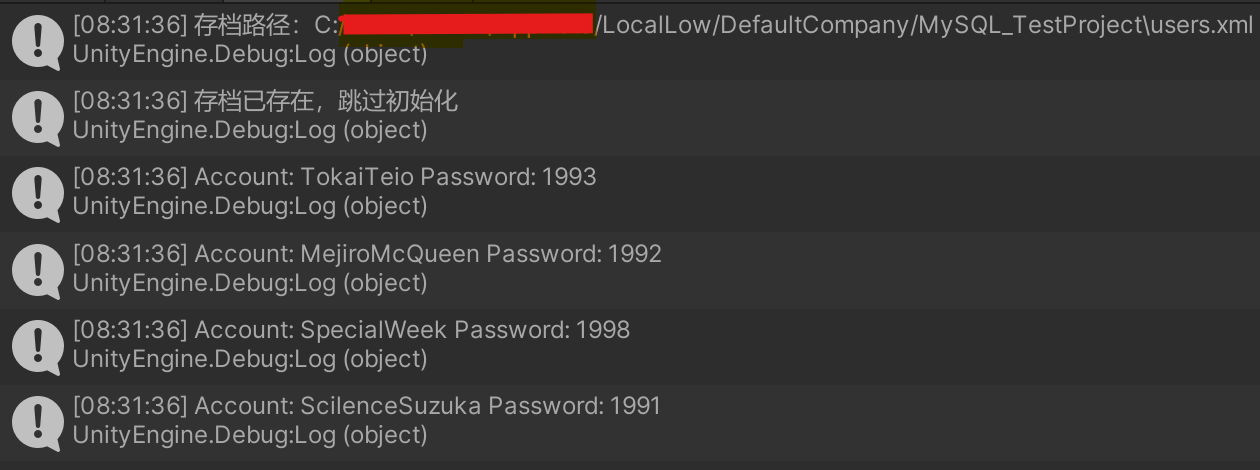
首次运行项目,我们可以看看原先xml文件中存储的用户账户信息:
随后我们进行注册和注销操作:
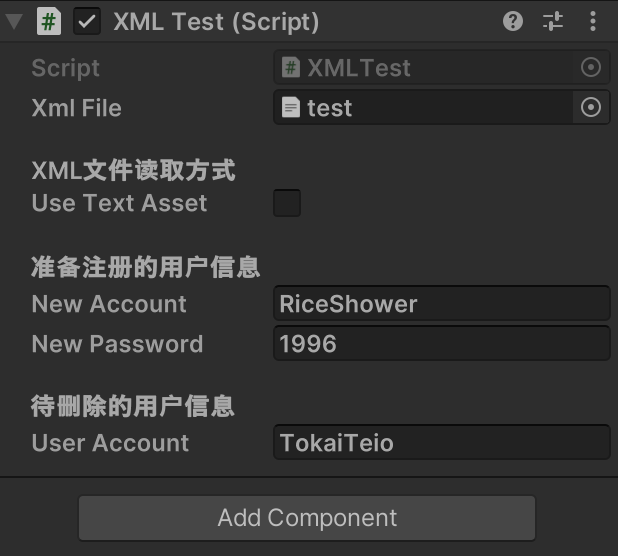
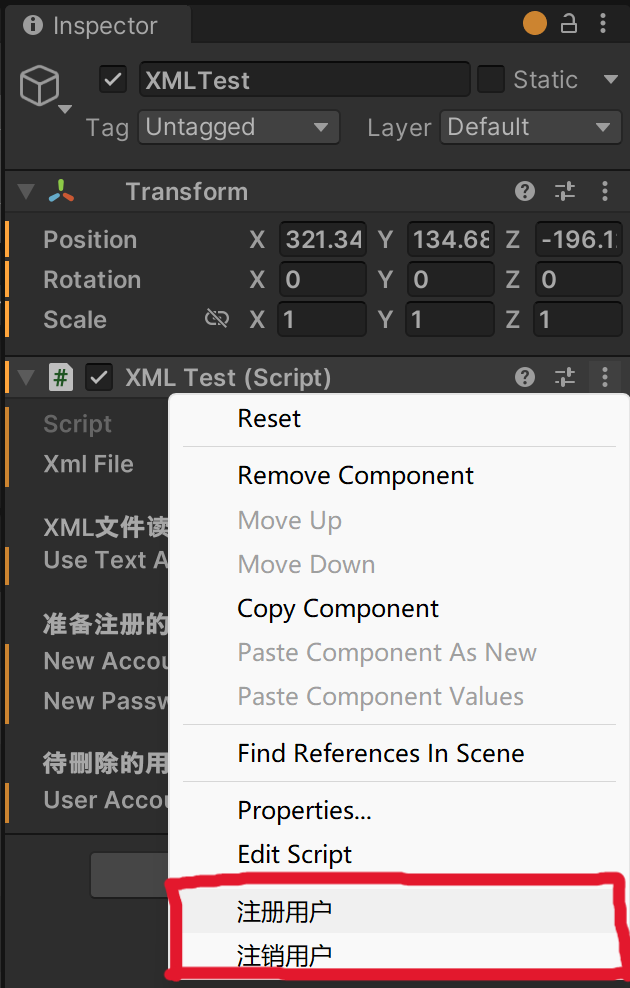
停止运行项目,可以看到文件被写入并保存:

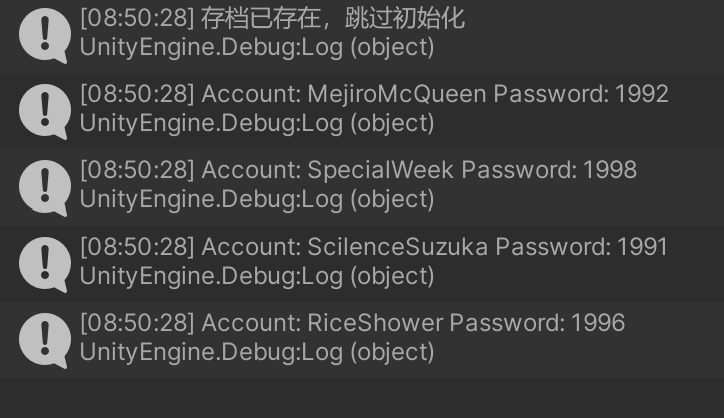
再次重启项目,可以看到更改已经被应用到文件中(新增用户“米浴”,删除了用户“东海帝皇”):
如果你成功了,恭喜你~
至此,本教程步入了尾声,此文章仅是鄙人对于XML的初步探索,只是一次非常非常简单的尝试,有关于XML还有许多内容,希望我们一起探索下去。路漫漫其修远兮,吾将上下而求索。